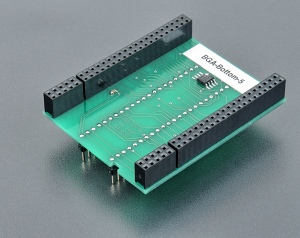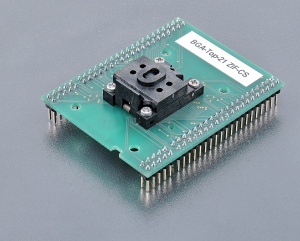
BGA-0289/0287
BGA-0289/0287
(ord.no. 70-0289/0287)
See: Converter manual | Accepted package(s) | Useable for programmer(s)
- special converter, assigned for memories in BGA package, for example Intel 28F160,320 family in FBGA48
- top board: BGA-Top-21 ZIF-CS (order no. 70-0287)
- bottom board: BGA-Bottom-5 (order no. 70-0289)
- ZIF socket accepts many variations of BGA packages, that differ in ball diameter, ball width and package thickness.
- The picture at Accepted package(s) section shows the range of all dimensions of BGA packages, which are accepted by this BGA-Top board.
- operation (mechanical) life of ZIF socket - 500.000 actuations
- made in Slovakia
| Ord. no | 70-0289/0287 |
| Socket | ZIF BGA48 (depopulated array of (48) spring probes), ClamShell type |
| Bottom | 2 rows, 2x 24 pins, square, 0.6x0.6mm, rows spacing 600mil |
| Class | BGA/LGA |
| Subclass | BGA converters |
Converter manual
- Insert converter to the device programmer ZIF socket according to the picture placed near of it. If you have some doubts about orientation of this converter in device programmer ZIF socket, it is valid general rule, the orientation of the text of title is the same as the text on the top of the device programmer.
- Open the converter ClamShell ZIF socket. Insert the device into it (place device on contacts). The right position of the programmed device in converter ZIF socket is show on the picture in control program PG4UW (Device info <Ctrl+F1> for selected device).
- Visually check position of device in converter ClamShell ZIF socket. If everything looks OK, close it and now, device is ready for programming.
- Be careful, because the incorrect insertion of converter to the device programmer ZIF socket or device to the converter ClamShell ZIF socket can damage the programmed device.
- To take out the device, open converter ClamShell ZIF socket and remove device from it.
- When you finish work with converter, remove it from the device programmer ZIF socket.
- Do not directly touch the pins of the converter and converter ZIF socket, because dirt may cause errors during programming of device.
- For handling with the device we recommended to use a vacuum pick up tool.
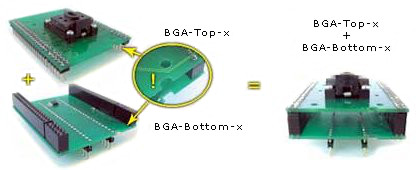
- The picture show, how to put together the BGA-Top-x ZIF-CS and BGA-Bottom-x boards to have complete BGA converter

Software note
- If software version, you're using currently, doesn't contain support for this programming adapter, please download the latest version of software - Regular or OnDemand - from our web site.
Accepted package(s)
| BGA package | ![]() |
![]() |
|