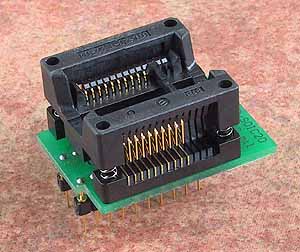
Insert adapter to the device programmer ZIF socket according to the picture placed near of it. If you have some doubts about orientation of this adapter in device programmer ZIF socket, it is valid general rule, the orientation of the text of title is the same as the text on the top of the device programmer.
Push the top of adapter ZIF socket to open it. Insert the device into the adapter ZIF socket. The right position of the programmed device in adapter ZIF socket is show at picture near (mainly left above) the adapter ZIF socket. Then release adapter ZIF socket. If you use this adapter for devices with less than 20 pins, then place device to the bottom edge of adapter ZIF socket. Upper contacts stay unconnected.
Visually check interconnection between device and adapter ZIF socket. If everything looks OK, the device is ready for programming.
Be careful, because the incorrect insertion of adapter to the device programmer ZIF socket or device to the adapter ZIF socket can damage the programmed device.
To take out the device push the top of adapter ZIF socket and remove device from it.
When you finish work with adapter, remove it from the device programmer ZIF socket.
Do not directly touch the pins of the adapter and adapter ZIF socket, because dirt may cause errors during programming of device.
For handling with the device we recommended to use a vacuum pick up tool.
Operation conditions: operating temperature 5°C ÷ 40°C (41°F ÷ 104°F), operating humidity 20%..80%, non condensing.
If programming yields isn`t 100% when using programming adapter or if some unreliability appears, try to connect one 22nF-100nF multilayer capacitor (that meet the EIA X7R or Z5U specification) between leads of adapter connected to pins VCC and GND pins of programmed chip.
Software note
If software version, you're using currently, doesn't contain support for this programming module, please download the latest version of software - Regular or OnDemand - from our web site.
Accepted package(s)
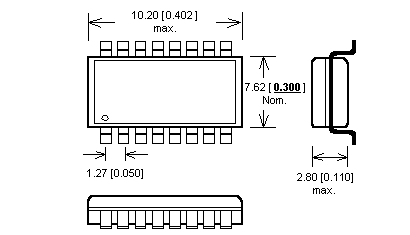
SOIC16
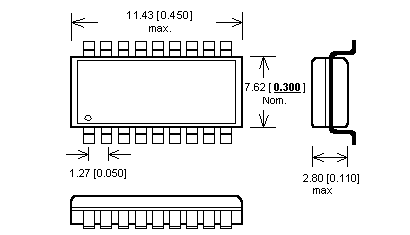
SOIC18
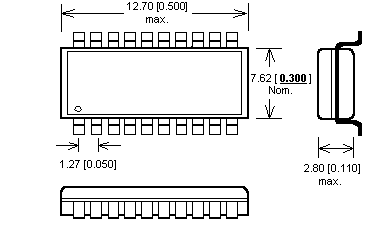
SOIC20
Note: This programming adapter / module may not support all devices in the package(s) mentioned above on your programmer. Please, verify situation for particular device(s) you are going to work with using actual Device list of your programmer.