


|
|
| Ord. no. | 70-0989 |
|---|---|
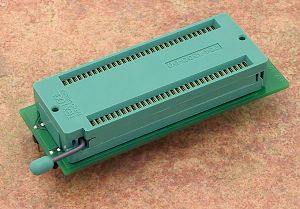
| Socket | ZIF SDIP64 |
| Bottom | 2x24 pins, square, 0.6x0.6mm, rows spacing 500mil |
| Class | Specialized |
| Subclass | Toshiba MCU |
| Availability in stock |
0 pcs.
[ We are sorry, that the item is not in stock at the moment. Please ask for availability, click here. other 1 pcs. within 3 working days ]
This number indicates quantity of items that could be produced from components in stock. Reasonable quantity of this product can be available within 3 working days. |
Price: US $395.00 [read this!]
Price 2-3: US $375.30
Price 4-7: US $363.40
Price 8+ : Ask for price [?]
Elnec fully understand needs of customers programming high volumes for which cost of adapters is one of most important component of costs. Therefore Elnec policy is to offer:
1. fixed discount when buying 4+ adapters of particular type,
2. individual discount for quantities 8+ according to type of adapter and demanded quantity. To get Quotation 8+ please click here:
Ask for price
We are sorry but your territory is covered by our sole distributor. Contact please the distributor for your country - listed in our web site.
Adapter manual
- Insert adapter to the device programmer ZIF socket according to the picture placed near of it. If you have some doubts about orientation of this adapter in device programmer ZIF socket, it is valid general rule, the orientation of the text of title is the same as the text on the top of the device programmer.
- Open the adapter ZIF socket by lever (lever is at upper position). Insert the device into it according to the picture placed near of it and close adapter ZIF socket by lever (lever is at lower position).
- Visually check interconnection between device and adapter ZIF socket. If everything looks OK, the device is ready for programming.
- Be careful, because the incorrect insertion of adapter to the device programmer ZIF socket or device to the adapter ZIF socket can damage the programmed device.
- To take out the device open the adapter ZIF socket by lever (lever is at upper position) and remove device from it.
- When you finish work with adapter, remove it from the device programmer ZIF socket.
- Do not directly touch the pins of the adapter and adapter ZIF socket, because dirt may cause errors during programming of device.
Software note
- If software version, you're using currently, doesn't contain support for this programming module, please download the latest version of software - Regular or OnDemand - from our web site.
Accepted package(s)
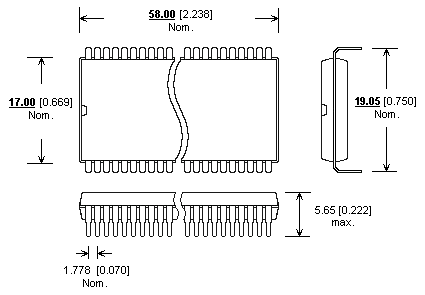
| SDIP64 |
 |
 |
